Showing posts with label Case Study. Show all posts

Monday, October 01, 2007

What to do when you can never have enough standard reports

One of the most common questions that I see on online registration RFPs is, "How many standard reports do you have?" It's a question that begs for a misleading answer, because there is no "standard" for reports in event registration and no two vendors' answers are comparable.

(Caveat: After thousands of industry discussions, the Accepted Practices Exchange (APEX) has published a few report "standards" for specific areas of meeting planning, but few people use these without making at least minor adjustments for their specific business needs.)

Early on, we stopped trying to give customers a dozen or a hundred standard reports in Certain Registration and focused on providing a minimal set of reports "out of the box", while allowing users to copy and customize those reports in order to define their own standard reports. But even this hasn't been enough to meet our goal of "one-click reporting" for all customers.


Reporting in Excel With Online Data

Last year, I described my experience on-site at the National FFA Organization's 79th Annual Convention. The 80th Convention just ended, so last month it was time to update their on-site reports for this years' event. This process reminded me of some unique reporting that I did for FFA using Excel Web Queries.

While most business users are familiar with Excel spreadsheets, not too many people use its more advanced features such as Web Queries, Macros, and Pivot Tables. Web Queries allow you to pull data from any Web site address into an Excel spreadsheet. Pivot Tables allow you to take tabular data in a spreadsheet and summarize it by any column or row. And macros allow you to record a series of actions within the spreadsheet and then automate them in the future.

The FFA requires on-site reports beyond the capability of Certain Registration. In addition to pixel-specific formatting requirements, they have several "special rules", such as single-day registrants should count as one-half of a person when calculating the total registration numbers. In order to meet their needs, I started with an Excel spreadsheet, where I used a Web Query on one worksheet to extract raw data from the FFA event in Certain Registration.


I next added a worksheet that used a Pivot Table to summarize this raw data into a simple table.


Then, I used Excel formulas to apply "special rules" and to transfer the desired data to a pre-formatted worksheet suitable for printing.


And finally, I recorded an Excel macro and associated it with the FFA icon.


In the resulting Excel spreadsheet, when an FFA user who is logged into Certain Registration clicks on their logo on the first worksheet, the macro automatically runs the Web Query, refreshes the Pivot Tables, and updates the printable worksheet via its formulas. The user then clicks the print button and pulls the report off the printer.

Learn more

I'll leave it to the reader to decide if they are interested enough in this process to learn how to apply Web Queries, Pivot Tables, and Macros to their Excel spreadsheets. If so then Microsoft's help files and online resources provide ample instruction.

Friday, May 11, 2007

Listen to Your Customers and You Might Learn Something

Sclerochronology is the study of physical and chemical variations in the accretionary hard tissues of organisms, and the temporal context in which they formed. Familiar examples include annual bandings in reef coral skeletons or daily growth increments in mollusk shells.

I learned this from our customer Beth Miller-Tipton of the University of Florida during a conversation at the Society of Government Meeting Professionals in Atlantic City last week. Beth also taught me that she is using our product to manage abstract submission for their upcoming Sclerochronology conference. This was news to me; I didn't know that we had an abstract management tool.


Behind the Curtains at Scientific Conferences

In my graduate school days at Berkeley I had the opportunity to help organize a few conferences for the California Catalysis Society. Scientific conferences typically have a higher ratio of speakers to attendees than other educational events. Let's say you're an expert in a particular area of science (such as Catalysis or Sclerochronology) and you find yourself appointed to be the host of a conference on the subject. When you begin to put the program schedule together, the first step is to issue a "Call for Papers", which you send to everyone in your field. Scientists, professors, and students who want to present their work at the event submit abstracts describing the content of their proposed presentation or poster. A conference usually has multiple sessions, each focussed on a particular topic. The session chair is an expert on that topic and has the job of selecting speakers, moving the presentations along (often only 15-20 minutes are allotted per speaker), and managing the discussion.

Presenters submit these abstracts for many reasons - their budget might not allow them to travel to the conference unless they are speaking, they may have recent results that they are about to publish and want to generate additional attention for their research, or they may be rehashing previous research in order to get another line on their Curriculum Vitae (the scientist term for resume and list of publications). Success in science, like most fields, is a combination of quantity and quality. Quantity of research is demonstrated by the length of your list of publications and presentations, while quality often depends on the number of citations that your research has, i.e. the number of other people whose work references yours. (Where do you think those guys at Google got their "page rank" idea?) These two factors combine to help determine your funding levels from grant applications, your promotion to tenure, your movement up the academic ladder into the elite universities of highest prestige - you get the idea. So getting your abstract selected is a big deal at some conferences.

Abstract Management Process

As the meeting planner, you have to collect the abstracts from prospective presenters, force the session chairs to review the abstracts and select their posters and presentations, and keep the presenters informed of their status (since many presenters cannot register or make travel plans until they know that their abstract will be accepted). Fortunately software is available to facilitate this process, although dedicated "Abstract Management" solutions can be expensive and are over-kill for many conferences.

Certain Registration Extended

Enter our clever customer Beth Miller-Tipton. She devised a process with her IT department and Certain Registration to use her existing registration system to collect both abstracts and registration and housing reservations. They first upload the abstract file (usually as a Word document or PDF) onto their internal servers, then link to a registration form in Certain Registration, where they collect the presenter's contact information, abstract title, presentation preferences, and so on. They use data integration to pass the web address of the abstract file into the registration form, so that they can produce a single report from Certain Registration with the contact information for all submitters, with hyperlinks to their abstracts. Beth and the session chairs sit down one day, run through this list on a projection screen, and click on each link to view the abstract. The chair (or committee) quickly decides which abstracts to accept for presentations, or which for posters, or which to decline if space is limited.

Without having to learn a new system or spend a bundle, Beth created an online abstract management process that works conveniently for everyone - the meeting planners, the session chairs, and the prospective presenters. I liked it so much that we decided to add a new custom question type ("File") into Certain Registration, so that she can manage even the file upload portion of the process within one system. Hopefully, many other customers and prospective customers will find this to be equally valuable.

Friday, March 16, 2007

Why be PCI Compliant?

I've spent three weeks discussing PCI Compliance, but why am I so concerned about protecting financial and personal information? Because there are a lot of bad people in the world, and the Internet has given them access to the more trusting (or "gullible", from their perspective) audience in relatively safe countries like the United States. Here are two recent experiences that could have led to financial loss.

Scam 1: "Please refund my other card"

I heard this story from one of our clients during a recent Performance Analysis.

An attendee registered for a training conference and attempted to use several different credit card numbers to pay for his tuition. (He eventually completed payment with a Visa card.) Weeks later, he sent an email to the event's registration support contact explaining that he would be unable to attend the conference, but that he had recently switched credit cards and would like the refund to be posted to his new credit card number. The support contact decide not to do this, because (1) PCI Compliant systems like Certain Registration don't support this process and (2) the request, combined with the number of failed payment attempts using multiple credit card numbers, "smelled fishy".

Later, the client found out that the Visa card used for tuition payment belonged to a older woman in Arizona, and after piecing this puzzle together, they refunded the full amount to the original card. Our contact notified their corporate security department, who in turn contacted the FBI's Internet Crime Complaint Center (IC3). It turned out that the "attendee" was a Ghana national involved in a fraud operation much larger than this incident. Fortunately for our client, because they listened to their instincts instead of immediately trying to satisfy the attendee's request (and because they were using a PCI compliant system), the investigation could be turned over to the FBI without financial loss for either them or the credit card victim.

Scam 2: "Sorry, but I wrote the check for too much"

The second experience hit closer to home. I recently moved and listed my previous townhouse for rent. I received an email from "Marcus", who informed me that he was placing a colleague in the north Dallas area for a year and would like to rent the house, and would it be okay to pre-pay six months' rent in advance? My suspicion was raised by the poor grammar in his email, but you can't argue too much with cash up front, so I accepted the offer.

Two days later I received a DHL overnight package from Dubai, United Arab Emirates with a cashier's check for $35,300 drawn on JP Morgan Chase Bank in Florida. Great - except that six months rent plus deposit was only $11,200. He then sent me an email stating that he had accidentally cut the check for too large of an amount, but he was not able to change it so could I please cash the check and then wire transfer the difference ($24,100) to his bank in the UAE?

Well, that was the end of the business deal for me, but I have learned that this con is common enough to get it's own FTC warning, and successful enough that the FBI IC3 is only interested in your case if you actually lost money. A few mornings later, I received a phone call from "Marcus" (which showed on my caller ID as originating from a Dubai country code) and from the background noise activity it certainly sounded like he worked in a call center operation as busy as that of any medium-size business in the U.S.


It's a jungle out there

The Internet has brought the world together, but unfortunately much of our world is still the Wild West. Be careful out there, and follow best practices like those of the PCI Standards.

Monday, December 11, 2006

Behind the Scenes: Setting Up and Managing a Blog

Well, I've been practicing this Blog thing for a few months now and I've decided to roll it out to the public. It was easier than I thought it would be to set up a Blog, but harder than I thought to manage an email subscription list.

Setting up a Blog

This part was easy. I choose Blogger (a Google subsidiary), because I had heard of it before and it only took me five minutes to get started. I wasn't frustrated enough to try anything else, but I've heard that Yahoo! has a pretty good blog engine now. I spent a half-day customizing the template so that I could set up the side bar you see on this page, but besides that the only time I spend on this Blog is the time it takes me to write the posts.

Managing a Subscriber Base

I thought that I could use Blogger to manage a subscriber database, but that turned out not to work. I want people to be able to subscribe or unsubscribe to my Blog so that I can notify them via email each time I make a new post.

After a little research, I found a free web-based subscription database management tool called Mach5 Subscriber. It's limited to 5,000 contacts, but when I have more readers than that then I'll be willing to upgrade to the paid version. In a few minutes I set up an account, selected the data that I want to collect from my audience, and Subscriber instantly created both a subscription signup page and a subscription management page. I then added these hyperlinks to my Blog so that readers can subscribe and unsubscribe from my email list.

Sending Notification Emails

The next step was to find a tool to let me send bulk email to my subscriber list. Mach5 has another product for this purpose, Mach5 Mailer, which is also free up to 50 emails at a time. This is a Windows-based application that integrates with Subscriber in order to allow users to send personal, customized emails to your subscription list. It sends both HTML and text versions, and can contain hyperlinks to your Mach5 Subscriber pages for your audience to manage their subscription.

The last hurdle was to find an email server that I could use to send the notification emails. Outgoing email requires a SMTP (Simple Mail Transfer Protocol) server. Fortunately, Greg Paik, the Director of Network Engineering at Certain, allowed me to use our Exchange server for the small scale of my current subscription database. Our SMTP Server requires me to connect to our VPN first in order to prevent unauthorized users from relaying spam through our network, but this isn't a big deal from my laptop, even when I'm on the road. When I outgrow the scale of Mach5's free tools, then I'll need to find another option for mail delivery. (Mach5 is working on a product called Mailer Express that will hopefully do this.)

Putting It All Together

Now I have the Blog, subscription database, bulk mail merge application, and outgoing email server. Each time I post to the blog, I'll send an email to the current subscriber list with the first paragraph and a hyperlink to the full posting. If you want to add or remove yourself from the subscription list, it's as easy as clicking on the hyperlinks in the email or on the left column of this page. And I hope that readers will send me topics that they would like me to discuss, and forward the subscription emails to their friends and colleagues.

Let the experiment begin!

Friday, November 17, 2006

On-Site Registration at the 79th Annual National FFA Convention

Indianapolis SkylineBob Osborn, Brett Weigl, and I were on-site with the FFA at their National Convention from October 23-26 in Indianapolis. With over 50,000 attendees, this was the largest convention to date that used Register123 for on-site registration.

Pre-Registration
FFA closed pre-registration on October 11, two weeks prior to the event. After that, attendees had to register on-site. For an event of this size, these two weeks allowed the FFA staff to complete on-site preparations without a constant flux of registrations and cancellations.

On-Site
We flew into Indianapolis on Monday so that we could set up the Internet connections and confirm the system configuration. For the on-site event, we created special registration forms that focussed on rapid data entry rather than custom branding.

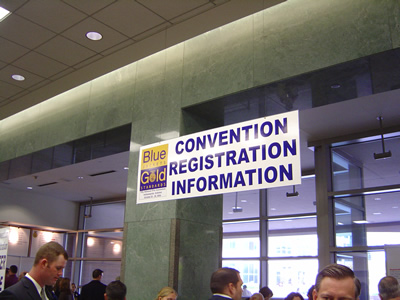
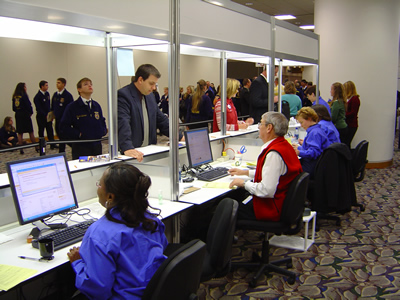
On-site registrants started at the information desk. This area helped attendees determine if they needed to enter the registration line, if they needed to walk to the "Issues Desk", or if they simply needed to have name badges printed for exhibitors.


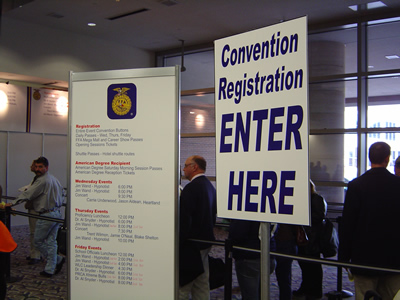
Attendees who entered the Registration queue saw the event agenda twice. Sessions that had sold out were posted clearly so that people wouldn't try to buy tickets for unavailable sessions at the counter.


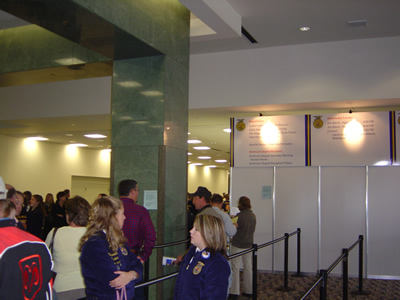
Notice that only 1 row of the 5 set up in the queue was full. Lines and wait times were reduced by about 75% compared to 2005, mainly because so many more attendees participated in the new online registration process. People who did want to register on-site completed a paper form while in the registration line, so that they would be ready to purchase tickets when their turn came up.


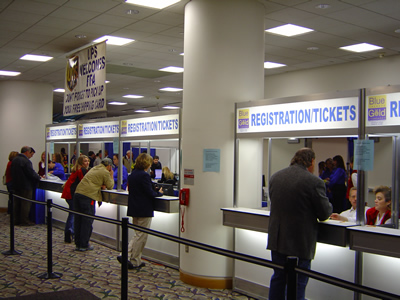
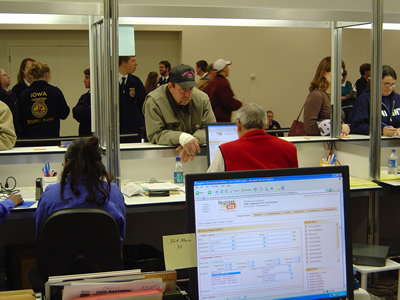
FFA set up 6 registration stations with 2 workers per station. Around the corner to the left is the "Issues Desk", which served people who lost tickets or needed to change their pre-registration order. Because of the higher proportion of pre-registrations this year, the "Issues Desk" line was longer than in past years.


Behind the counter, registration desk workers used the new "Admin-side Forms" in Register123 to quickly process on-site registrations, collect payment, and print out confirmations and receipts. FFA receives a large number of P.O., check, and cash payments on-site, although the percentage of credit card payments increased this year.


After the front line workers entered the registration data, the system sent a "Pick Plan" to the back office workers. These employees selected the purchased tickets, bundled them with the registration materials, and met the attendee at the end of the registration desk. All transactions were monitored by FFA's registration manager (Sheridan Gilchrist) from a second-row PC station.


Meanwhile, I sat in the back-office at another monitoring station. Here I looked for issues and created special reports for FFA. This year was something of a learning experience for us, and these reports will become part of the standard features in Register123 for next years' events.


Overall, the on-site registration process went very smoothly. We lost Internet access on the first day for a few minutes, which was quickly addressed by the convention services. Now that Internet access is approaching the reliability of electricity in modern convention centers, the major problem with using an online registration system on-site is being eliminated.

Lessons Learned
In 2007, we plan to reduce the number of manned registration stations from 6 to 4, and to add 2 "Self-serve registration kiosks". These kiosks will allow people to register themselves on-site via Register123, as long as they are paying by credit card. One FFA worker will "float" between the two self-serve kiosks, in order to help attendees who have trouble. This process should work much like the self-service check-in stations at airports.

Also, we will likely add a second "Issues Counter", in order to handle the increased number of pre-registrants who need to make changes to their registrations on-site.

Lastly, we will modify the on-site name badge printing form in order to reduce the number of steps required to print a name badge. Thanks to Register123's flexibility, these process changes can be configured without any software development.

Wednesday, October 25, 2006

On the front lines at the 79th Annual National FFA Convention in Indianapolis

Nearly two years ago, Certain won the contract to handle online registration for all events sponsored by the National FFA Organization.

Background

The FFA (formerly called the "Future Farmers of America") is a national association of state FFA chapters. They hired Jeff Rasco and Rod Marymor of Tech3 Partners to mangage their selection of an Online Convention Registration (OCR) application. Tech3 worked with FFA to determine their key needs and to deliver a detailed RFP to all major online event registration vendors. Certain was one of four finalists selected to present to the FFA operations committee at their headquarters, and in March 2005 we signed a multi-year contract.

Time to Deliver

Now, 18 months later, the 79th National FFA Convention begins today at the RCA Dome and convention center in Indianapolis. After a pilot test at last year's convention in Louisville, the implementation team from Certain (Bob Osborn, Sr. Account Manager, Brett Weigl, Director of Client Services, and I) was ready to handle FFA's somewhat unique online registration requirements. These include:

Registration
  • The National FFA Convention will have around 50,000 attendees, separated into about 50 groups such such as exhibitors, members, alumni, advisors, parents, staff, press, speakers, judges, etc. FFA used Register123's unlimited registration categories to manage these groups.
  • With 50,000 attendees, the FFA had to schedule three Opening Sessions of ~15,000 - 18,000 each in the RCA Dome. They wanted to limit the total number of tickets selected for any of the three Opening Sessions to be equal to or less than the total number of registrations purchased. (Apparently, in past years some advisors took advantage of an older registration system by splitting their groups into multiple Opening Sessions and getting more "free" opening session tickets than the number of registrations they purchased.) FFA used Register123 Packages and Form Logic in order to enforce this complex business requirement.
  • FFA has an existing Web Site with state chapter login, which is integrated with their PeopleSoft CRM database. They used Register123 Form Integration features to seamlessly pass state chapter information from their web site intranet to the registration form when each registrant clicked on the "Register" hyperlink.

Ticket Management

  • State chapter advisors register multiple student attendees at once, and FFA only collects the contact information for the advisors. FFA used Register123's unlimited Program Module in order to enter more than 175 sessions, tours, concerts, parking passes, etc., where advisors purchased 1-100 tickets at a time for each item.
  • FFA delivers paper tickets and purchased items to all pre-registered attendees. They used Register123 Personal Documents to create a custom "Pick Plan", which their warehouse technicians used to prepare indivudal packets and ship via UPS.
  • FFA also used Register123 Web Integration Links to integrate with the UPS Worldship application, so that employees or attendees could use their Registration Code to track their package shipment on the UPS web site with a single click.

Financials

  • The National FFA Convention must cover its expenses through registration fees and additional fees for tours and concerts. FFA processed over a million dollars via Register123's Financial Module using integrated credit card processing and check/P.O. payments.
  • FFA uses Peoplesoft Financials and CRM application as their association management solution. Their IT team used Register123's Budget Module to store the PeopleSoft General Ledger Account Numbers with each fee, and Register123 Custom Reports to create batch files with payment and fee information. The reports were customized with the column headers and tab-delimited text format required by FFA's automatic nightly import into Peoplesoft.

Housing

  • The FFA worked with the Indianapolis Convention & Visitors Association (ICVA) to contract rooms with nearly every hotel in Indianapolis (162 hotels with 12,000 peak room nights and over 30,000 total room nights). The ICVA used Passkey to manage the city-wide housing reservations for FFA. Register123 integrates with Passkey to provide a seamless registration system for attendees.
  • In order to meet their hotel commitments, the FFA offered discounted registration ($30 vs. $40 per person) for attendees who book inside their room block. Because students often stay four or five per room, the FFA wanted to allow only up to 5 discounted registrations per room reservation processed within the block. FFA used Register123's "Packages" feature of the Program Module and "Form Logic" feature in order to enforce these business requirements on their attendees.

On-Site Registration

  • About 10,000 attendees and advisors register on-site, and many pay with cash or pre-printed checks drawn on purchase orders. FFA used Register123's on-site registration features to create simple "Admin-side forms" that registration desk temp workers were able to learn and use after less than 10 minutes of training.
  • FFA used Register123's "split payments" and "cash payments" features in order to process multiple payments against a single order, to accept cash on-site, and to calculate change. Register123 payments reports tracked cash receipts per registration desk worker (with an audit trail based on user name and date-time posted) in order to maintain cash security on-site. (The six foot - six inch off-duty police officer helped this situation, I think.)

I'll post more information (and pictures) tomorrow showing all of this in action from behind the on-site registration desk.

Friday, October 20, 2006

UI and UE Design for web-based applications

On Monday, Certain started a design process to overhaul our User Interface (UI) and our User Experience (UE).

Why design matters

Our online registration application is used by over 50 people for their livelihood. Hundreds of our most active users spend a majority of their workday with it. And thousands of event attendees rely on it for about ten minutes a day. The attendees just expect it to work without explanation, and to let them get on with their day. The users need it to boost their efficiency so that they can justify increased pay, decreased hours, and reduced frustration. Our employees need Certain Registration to bring in revenue so that the company can grow with us.

The current application uses a design created in 2001. So the design that we produce over the next 3 months will affect the lives of millions of people for the rest of this decade and beyond. Good design is not easy, and it's definitely not automatic.

Who can do design

You don't have to wear stylish black clothes and square-rimmed glasses to do good software design. You need to know how the users of the application work on a daily basis, what tasks they need to accomplish, and what the application currently lacks. This knowledge is gained through observation, and observation changes with perspective. So I brought together creative minds from all departments: Kathy Isola (Sales), Ryan Manville and Kevin Linder (Development), Jason Whittenberg, Alan Rhody, and Katie Schuler Herstein (Product Design), Cole Blevins and Bob Osborn (Client Services), Paul Bosky (Training), Dana Chrisler (Marketing), Doug Goldman (Founder), and Bruce Browne (External Design Expert).

How to do design

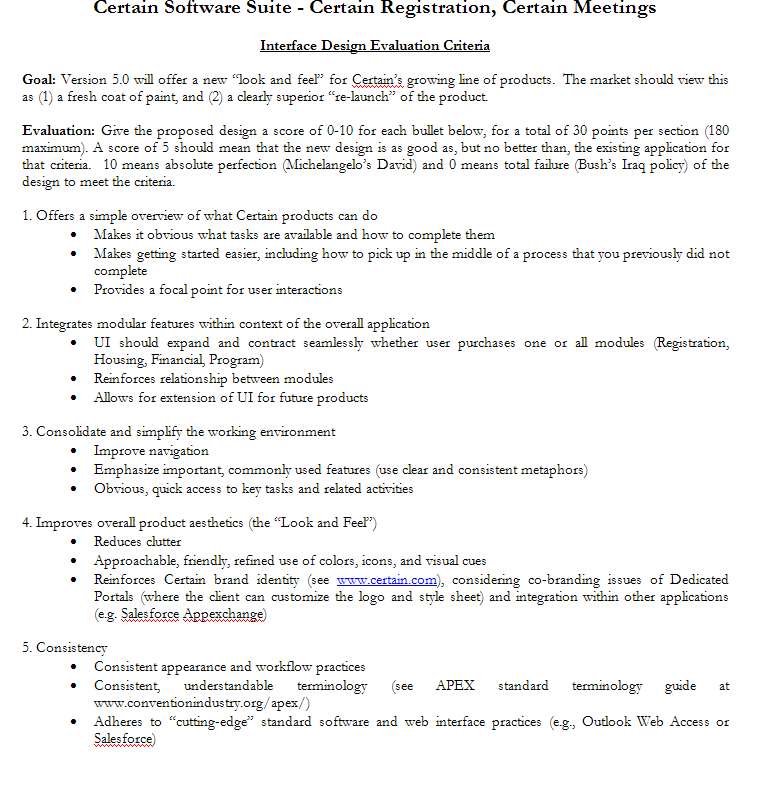
We used Bruce Browne’s design methodology from his Quicken days with Intuit:

  1. Define goals and objectives
  2. Research and Review: Evaluate existing interface. Identify key problem areas. Map current application organization. Review groupings of tasks/features.
  3. Brainstorm new designs: Break into groups of 1-2 people to produce design alternatives, with each group focused on one Use Case.
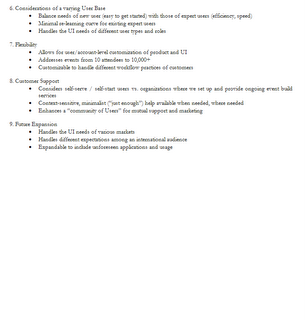
  4. Review: Present designs to larger group for evaluation using objective criteria, and select design metaphors for further refinement and evaluation

Outcome

Over the next several weeks, we will continue to refine our design and post new mockups and wireframes in an internal Wiki for review and comment. Then, we will open the best designs to our community of expert Users, for their comment and further refinement. I'll continue to update you on our progress as we go.